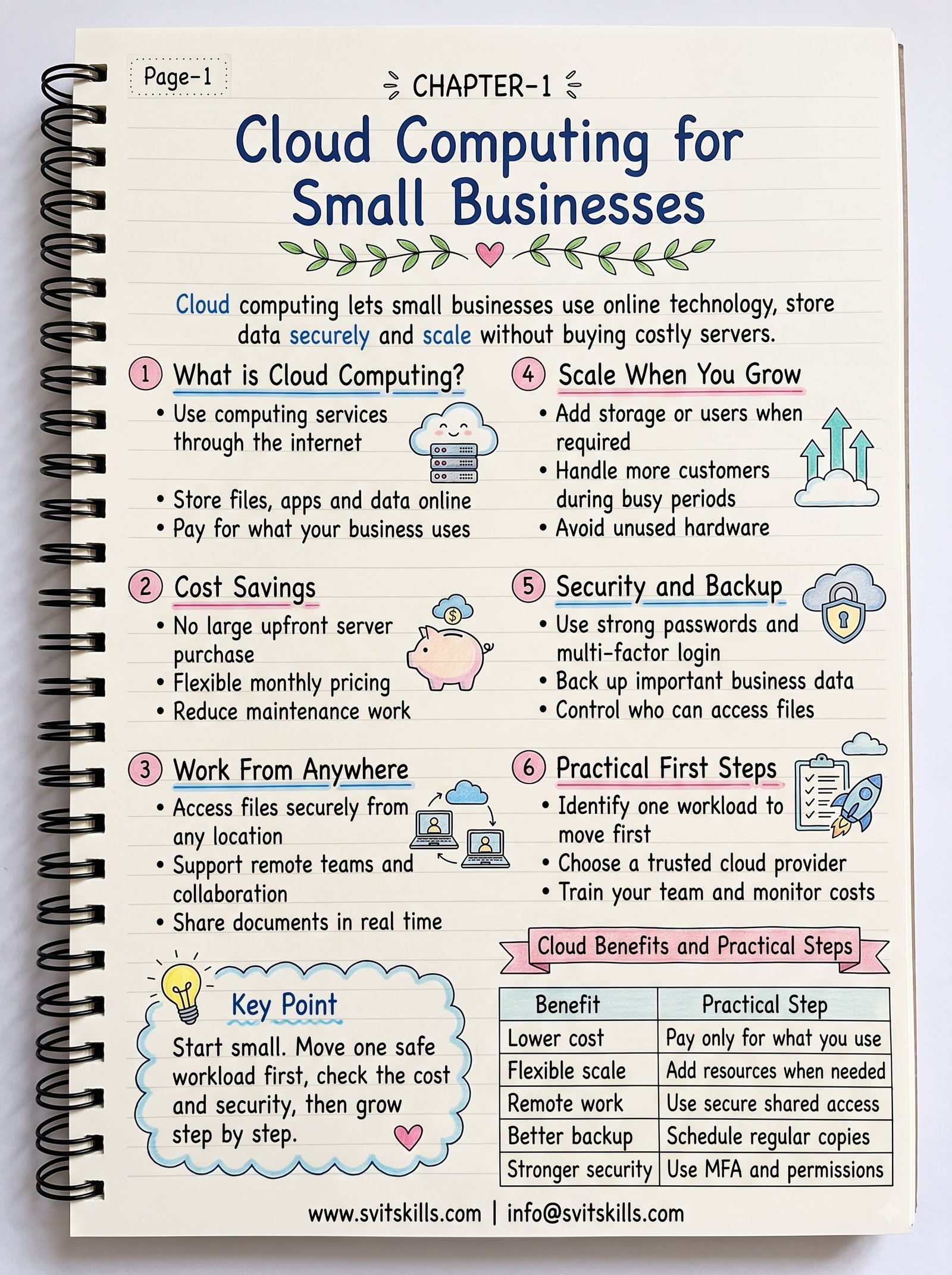
How Cloud Computing Can Transform Small Businesses: Key Benefits and Practical Tips
Why Cloud Computing Is a Game Changer for Small Businesses
For startups and established small firms alike, the shift to cloud services is more than a trend; it’s a strategic move that can streamline operations, cut costs, and unlock new opportunities. Unlike traditional on‑premises solutions, cloud computing delivers software and infrastructure on demand, eliminating the need for large upfront investments in hardware, licenses, or data centers.
Cost Savings: Pay Only for What You Use
Reduced Capital Expenditure
Buying servers, networking gear, and storage devices requires substantial capital, often followed by ongoing maintenance costs. Cloud providers let you pay a monthly fee for virtual servers, databases, and storage, turning a hefty CAPEX into manageable OPEX.
Example: A Local Boutique Using AWS Lightsail
Jane runs a boutique that sells custom clothing. She migrated her website to AWS Lightsail, paying just $5 per month for a virtual server and storage. By eliminating the need to purchase and maintain a local server, Jane saved $1,200 annually and could reinvest the savings into marketing.
Scalability: Grow Without the Hassle
Instant Resource Allocation
During a product launch, traffic spikes can overwhelm a small business’s infrastructure. Cloud platforms automatically scale resources—CPU, memory, bandwidth—to meet demand, ensuring smooth performance without manual intervention.
Example: Seasonal Surge for an Online Store
During the holiday season, an online retailer’s traffic doubled overnight. By leveraging Microsoft Azure’s auto‑scale feature, the retailer added additional virtual machines in minutes, preventing downtime and lost sales.
Flexibility: Work from Anywhere, Anytime
Remote Collaboration
Cloud‑based tools like Google Workspace, Microsoft 365, and Slack enable teams to collaborate in real time regardless of location. File sharing, version control, and instant messaging are all accessible from any device with an internet connection.
Example: A Consulting Team Across Multiple Offices
A consulting firm spread across three cities used Google Drive for document storage and Google Meet for video conferences. Projects progressed smoothly, and clients received updates instantly, improving satisfaction and reducing travel expenses.
Security and Compliance: Protecting Your Data
Built‑In Protection Features
Major cloud providers invest heavily in security—encryption, multi‑factor authentication, regular patching, and compliance certifications. Small businesses gain enterprise‑grade security without hiring a full‑time security team.
Example: A Dental Practice Using Google Cloud
The practice stored patient records on Google Cloud Storage, leveraging HIPAA‑compliant encryption and access controls. They avoided the cost and complexity of securing an in‑house data center while meeting regulatory requirements.
Common Mistakes Small Businesses Make with Cloud Adoption
- Over‑Provisioning Resources: Buying more virtual machines than needed leads to unnecessary costs. Start with a baseline and use auto‑scale to adjust as needed.
- Ignoring Data Governance: Failing to define data ownership and retention policies can create compliance gaps. Establish clear guidelines before migration.
- Vendor Lock‑In: Choosing proprietary services can make it difficult to switch providers later. Use open standards or multi‑cloud strategies when possible.
- Neglecting Backup Plans: Relying solely on the cloud’s redundancy without external backups can be risky if data is accidentally deleted.
How to Start: A Simple Migration Checklist
- Audit your current IT assets and identify non‑critical workloads.
- Choose a cloud provider that aligns with your industry’s compliance needs.
- Set up a pilot project—migrate a single application or database.
- Implement monitoring and cost‑management tools.
- Train staff on cloud fundamentals and security best practices.
- Gradually move additional workloads, leveraging automation scripts.
Conclusion: Cloud Computing as a Competitive Advantage
For small businesses, the cloud offers tangible benefits: lower upfront costs, instant scalability, seamless collaboration,